Codicon
brew install --cask font-codicon
v0.0.45
—
2
30-day installs · #8213
6
90-day · #7361
99
365-day · #4478
1.1k
★ GitHub stars · updated 4mo ago
Links
- https://github.com/microsoft/vscode-codicons
- GitHub: microsoft/vscode-codicons
- Brew formula source: Casks/font/font-c/font-codicon.rb
Raw metadata
{
"alternatives": [],
"artifacts": [
{
"font": [
"package/dist/codicon.ttf"
],
"target": "/$HOME/Library/Fonts/codicon.ttf"
}
],
"auto_updates": null,
"categories": [],
"deprecated": 0,
"deprecation_reason": null,
"desc": null,
"disable_reason": null,
"disabled": 0,
"display_name": "Codicon",
"enrichment_fetched_at": "2026-06-20T22:43:08+00:00",
"first_seen": "2026-06-20T00:47:34+00:00",
"full_token": "font-codicon",
"github_default_branch": "main",
"github_last_commit_at": "2026-06-19T17:55:53Z",
"github_readme_excerpt": "# Codicons\r\n \r\n[](https://www.npmjs.com/package/@vscode/codicons)\r\n[](https://www.npmjs.com/package/@vscode/codicons)\r\n[](https://github.com/microsoft/vscode-codicons/actions/workflows/build.yml)\r\n[](https://github.com/microsoft/vscode-codicons/actions/workflows/build.yml)\r\n\r\n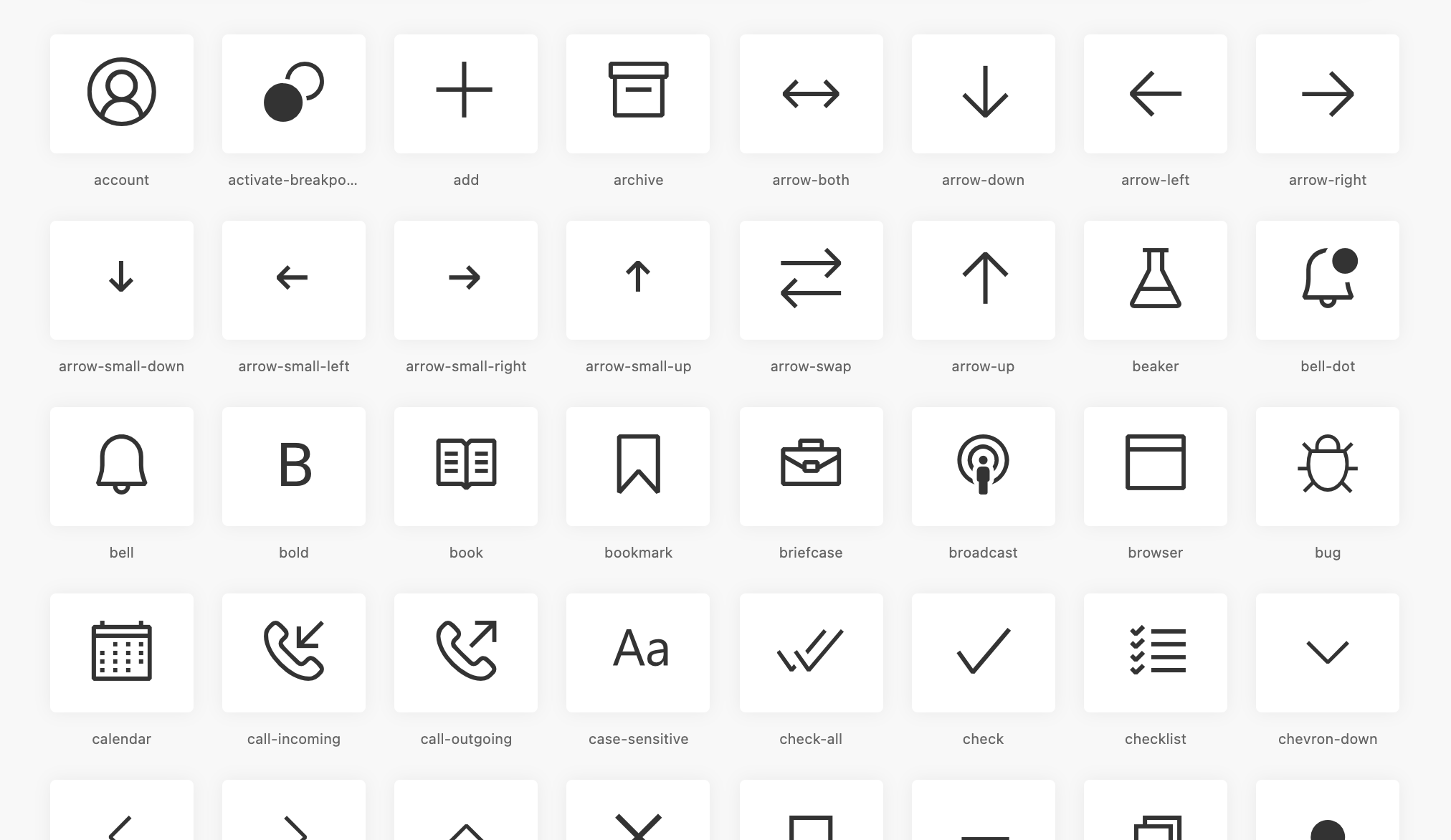\r\n\r\nThis tool takes the [Visual Studio Code icons](https://github.com/microsoft/vscode-codicons/tree/main/src/icons) and converts them into an icon font using [fantasticon](https://github.com/tancredi/fantasticon).\r\n\r\nUsing the [Visual Studio Codicon Lookup](https://microsoft.github.io/vscode-codicons/dist/codicon.html) you can preview and search for icons.\r\n\r\n## Install\r\nYou can use the [npm package](https://www.npmjs.com/package/@vscode/codicons) and install into your project via:\r\n\r\n```\r\nnpm i @vscode/codicons\r\n```\r\n\r\n_Note: We\u0027ve deprecated `vscode-codicons` in favor of `@vscode/codicons`_\r\n\r\nIf you\u0027re building a VS Code extension, see this [webview extension sample](https://github.com/microsoft/vscode-extension-samples/tree/master/webview-codicons-sample) on how to integrate.\r\n\r\n# Building Locally\r\n\r\nAll icons are stored under `src \u003e icons`. The mappings of the class names and unicode characters are stored in `src/template/mapping.json` as well as the default styles under `src/template/styles.hbs`.\r\n\r\n## Install dependencies\r\nAfter cloning this repo, install dependencies by running:\r\n\r\n```\r\nnpm install\r\n```\r\n\r\n## Build\r\n\r\n```\r\nnpm run build\r\n```\r\n\r\n## Update packages\r\n\r\nYou can run `npm outdated` to see if there are any package updates. To update package",
"github_repo": "microsoft/vscode-codicons",
"github_stars": 1129,
"github_topics": [],
"homepage": "https://github.com/microsoft/vscode-codicons",
"homepage_og_description": null,
"homepage_og_image": null,
"homepage_title": null,
"installs_30d": 2,
"installs_365d": 99,
"installs_90d": 6,
"last_seen": "2026-06-20T00:47:34+00:00",
"llm_generated_at": null,
"llm_model": null,
"names": [
"Codicon"
],
"one_liner": null,
"rank_30d": 8213,
"rank_365d": 4478,
"rank_90d": 7361,
"raw_hash": "18b41d6402c2b9ac",
"ruby_source_path": "Casks/font/font-c/font-codicon.rb",
"tap": "homebrew/cask",
"token": "font-codicon",
"version": "0.0.45",
"why_use_this": null
}